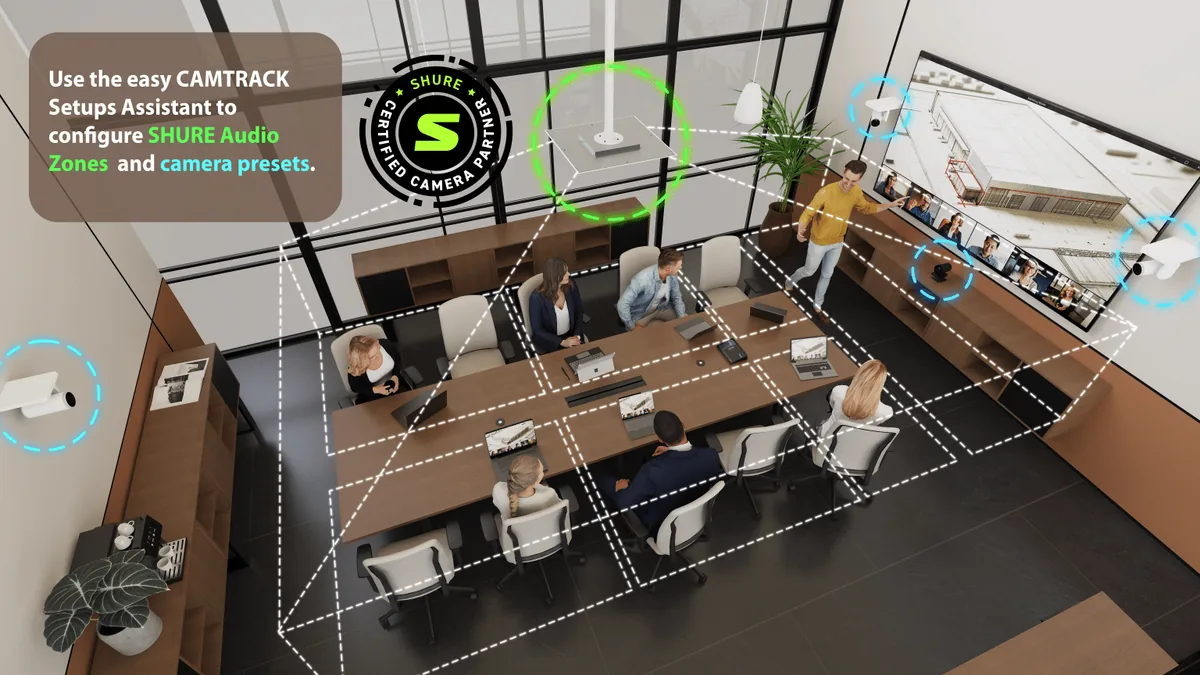
For years, voice-activated multi-camera switching has been the kind of feature I described to clients with a long disclaimer attached. Yes, we can do it. Yes, it’s great when it works. And yes, it will require a specific camera ecosystem, a beefy DSP, and real programming hours to make the whole thing behave. That disclaimer is starting to get shorter — and the Inogeni and Shure integration is a big reason why.
INOGENI recently joined Shure’s Camera Partner Program with their CAMTRACK solution, becoming only the third certified partner alongside AVer and Datavideo. It caught my attention because of what it changes for the rooms I spec every week.
How CAMTRACK uses Shure IntelliMix for camera switching
The core idea is elegant. Shure’s ceiling array microphones (MXA920, MXA901, and the rest of the IntelliMix family) already know where sound is coming from in a room. They steer DSP lobes at active talkers and deliver clean audio to the far end. CAMTRACK takes that same spatial intelligence and uses it to drive the cameras.
When someone at the head of the table starts speaking, Shure flags the location. CAMTRACK maps that location to a camera preset — or an AI tracking mode on a PTZ that supports it — and switches the video output accordingly. The downstream experience is a single, clean USB stream into Microsoft Teams, Zoom, Webex, or whatever UC platform the room is running. The far end sees the right face at the right time, without anyone in the room touching a control panel.
The ceiling mics already know where the talker is. Using that data to drive cameras instead of building a parallel tracking system is one of those ideas that looks obvious in hindsight.
Camera-agnostic: the part that changes the game
This is where it gets interesting for integrators and AV consultants. Historically, serious auto-switching tied you to a specific camera brand and ecosystem. If a client had already standardized on Canon, Sony, Panasonic, or AVer PTZs — or inherited a mix from previous projects — you were either doing a forklift upgrade or writing a lot of custom control code.
CAMTRACK is camera-agnostic across the major PTZ manufacturers and supports essentially any VISCA-over-IP camera on the market. That includes:
- Canon, AVer, Sony, and Panasonic PTZ lineups.
- Any third-party PTZ that speaks VISCA over IP — which, in 2026, is most of them.
Translation: the client’s existing cameras probably work. That’s a meaningful line item to not quote.
No-code setup and where it fits in a project
The other big claim is no complex programming. Setup runs through a web-based assistant that walks you through associating mic zones with camera presets. Inogeni is positioning CAMTRACK as something you commission in an afternoon rather than a project phase.
I’ll hold my full judgement until I’ve run one in a real deployment, but even if the reality is “most of the way there,” it’s a meaningful change. For mid-size corporate rooms and education spaces that want a polished hybrid experience but can’t justify a full Q-SYS programming engagement for camera automation, this fills a real gap. When the room actually needs custom logic — complex recall scenarios, Lua-driven behaviours, cross-system integration — that’s where a proper control platform still earns its keep.
Scale: 8 cameras standard, 12 in the PRO version
CAMTRACK handles up to 8 PTZ cameras in the base model, and 12 in the PRO version. That’s not a huddle-room number. Those specs are squarely aimed at:
- Large boardrooms and executive training rooms.
- Classrooms and lecture capture setups that need instructor, student, and board coverage.
- Town halls and all-hands rooms that used to require a dedicated operator to switch cameras.
- Courtrooms and council chambers where participants speak from fixed, well-defined positions.
Any of those spaces historically meant a five-figure programming line, proprietary PTZ hardware, and a maintenance story that broke the first time a camera was replaced. CAMTRACK materially lowers all three numbers.
Who should care (and who should wait)
If you’re an IT or facilities lead looking at a multi-camera conference room project, this is worth putting on the shortlist alongside whatever your integrator has historically proposed. If you’re already running Shure ceiling arrays, it’s almost a no-brainer to evaluate. CAMTRACK also picked up two awards at ISE 2026, so the industry is clearly paying attention.
Where I’d still proceed carefully: rooms with unusual geometry, heavy glass, or difficult acoustics will still need thoughtful system design. No amount of clever switching logic compensates for a room where the mic can’t reliably locate the talker in the first place. Get the acoustics and mic placement right, then let CAMTRACK do its job.
Planning a multi-camera conference room in Vancouver?
If you’re scoping a boardroom, lecture space, or council chamber that needs voice-activated camera switching, I’d love to help you think through whether CAMTRACK, a full control-system approach, or a hybrid of both is the right call for your space. Get a free room assessment and we’ll walk through the room, the existing Shure and camera stack, and what “good enough” actually looks like for your users.